Calendar
Calendar is derived from Control class.
[lide.widgets] ^1.1lide.widgets.controls.calendar 1.0
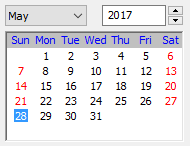
The calendar control allows the user to pick a date.
The user can move the current selection using the keyboard and select the date (generating an event) by pressing <Intro> or double clicking it.
The general look of a control at runtime is demonstrated in the following picture:
Constructor
Control class has a single constructor:
Calendar:new {
   object Parent, string Name,
   number PosX, number PosY,
   number Flags = CAL_SHOW_HOLIDAYS + CAL_MONDAY_FIRST
}
Arguments
These arguments are received by class constructor.
| Argument | Description | ||||||||||||||||||||||||
|---|---|---|---|---|---|---|---|---|---|---|---|---|---|---|---|---|---|---|---|---|---|---|---|---|---|
| Name | The control name | ||||||||||||||||||||||||
| Parent | The control parent | ||||||||||||||||||||||||
| PosX | Position related to X | ||||||||||||||||||||||||
| PosY | Position related to Y | ||||||||||||||||||||||||
| Flags | Possible style modificators for Calendar control:
|
Events
The following events are emitted by this class:
| Event name | Description |
|---|---|
| Calendar.onSelChanged_ | When the selected date was changed. |
| Calendar.onDoubleClicked_ | When the selected day was changed. |
Inherited Methods
These methods are inherited from its super classes:
| Class Method | Description |
|---|---|
| Object:getName | Returns control’s name. |
| Object:setName | Sets the control name. |
| Widget:getParent | Returns control’s parent. |
| Widget:setParent | Sets the control parent. |
| Widget:getPosX | Returns control’s position related to X. |
| Widget:setPosX | Sets the control position related to X. |
| Widget:getPosY | Returns control’s position related to Y. |
| Widget:setPosY | Sets the control position related to Y. |
| Widget:getEnabled | Returns true if is enabled. |
| Widget:setEnabled | Set control enabled or disabled. |
| Widget:getVisible | Returns the control visibility. |
| Widget:setVisible | Returns the control visibility. |
| Widget:getBind | Returns a reference to the C++ control. |
Class Methods
These methods are defined by this class.
Calendar:enableYearChange
It allows or disallows the user to change the year interactively.
| nil | Calendar:enableYearChange( bool Enable = true ) |
Calendar:enableMonthChange
It allows or disallows the user to change the month interactively. Note that if the month cannot be changed, the year cannot be changed neither.
Returns a boolean: true if the value of this option really changed or false if it was already set to the requested value
| bool | Calendar:enableMonthChange( bool Enable = true ) |
Calendar:enableHolidayDisplay
It enables or disables the special highlighting of the holidays.
| nil | Calendar:enableHolidayDisplay( bool Display = true ) |